Launching easier course selection at Penn

Timeline

Timeline

Timeline

Half a semester

Role

UX Designer

Team

Me!

Tools

Figma

Canva

The Problem

Path@Penn is frustrating for students

Path@Penn is the course selection site for Penn students. It is notoriously hard to navigate, confusing for students to understand, and leaves students feeling unable to create their schedules confidently. The first project in this UI/UX class was to redesign the Path@Penn experience using real life student interviews to inform our choices.

Research

3 interviewees, countless problems identified

Through my interviews with three different students across Penn, I identified a plethora of problems and wants users expressed, narrowed them down to eight How might we's, and used those identify redesigns and new features.

Make it more…

1

Clear, visible, and intuitive

Many students aren't aware of how to use the site, or even useful features that it has. And the submit button is doesn't work.

2

simple to understand complex features

Students avoid complex features because they don't know how to use them or find them, costing them spots in a class.

3

Streamlined

Students are constantly clicking in and out of tabs trying to reference course reviews or multiple courses.

Streamlined

Students are constantly clicking in and out of tabs trying to reference course reviews or multiple courses.

Redesign

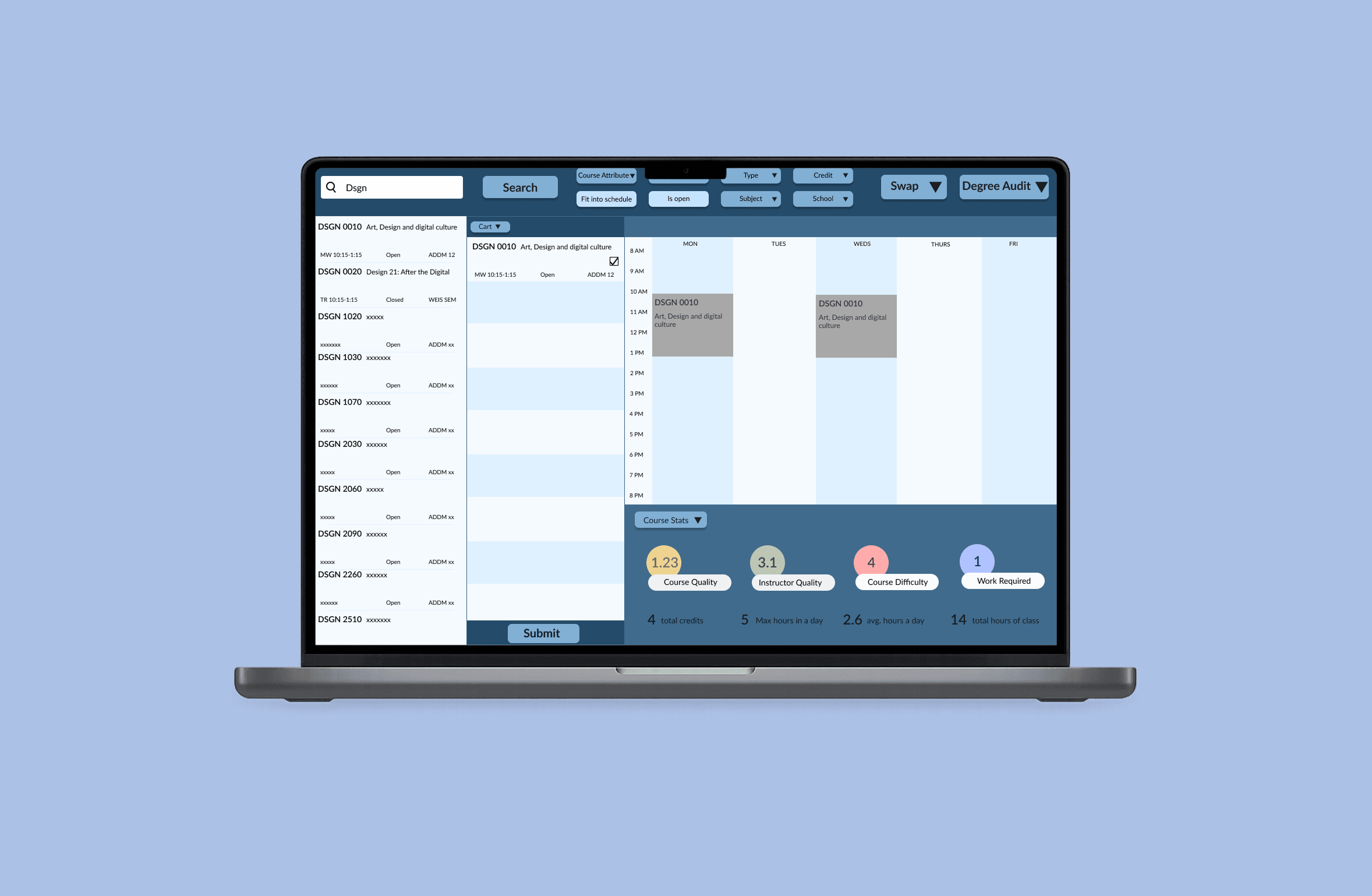
Reimagined course search

Making it more clear, visible, and intuitive

Visible

Drop down menus to keep all filters visible

Streamlined

Display of all courses and necessary info without taking the student to an isolated screen

Intuitive

Prioritize course section info over while still displaying all info so student does't have to go looking for it

Simple

2-click confirmation instead of multiple screen change to just add a course

Clear

An actual submit button and also being able to select and deselect right in the cart and not on another page

Visible

Drop down menus to keep all filters visible

Simplified swap feature

Making it more simple to understand complex features

Visible

Feature now more visible and easy to find

Simple yet complex

side by side menus holding all the classes, no need to navigate elsewhere, and clear language about what is being changed

Intuitive

Students are told what is being swapped in confirmation process

Intuitive

Students are told what is being swapped in confirmation process

New mirror function

Making it easier to compare without frustratingly have multiple tabs open

Customizable

Third screen with a choice of swap, course stats, or degree audit. Easy to compare alongside courses and schedule

Flexible

Ability to view requirements while browsing, and no need for outside sources for stats

Streamlined

Eliminates need for outside sources, keeping the process entirely on Path@Penn

Customizable

Third screen with a choice of swap, course stats, or degree audit. Easy to compare alongside courses and schedule

Outcome

From concept to real life movement

I got recommended to present my work to the Chair of faculty senate and director for one of my minors, who was at the time working on an audit for an upcoming Path@Penn Redesign!